Jul 07, 2024
The Rise of WebViews: How CapacitorJS is Revolutionizing Cross Platform Development
Introduction
Imagine this scenario: Your CEO calls a meeting to discuss product strategy. You’re already weeks behind on shipping your web application this quarter when they announce the need for a mobile app to stay competitive. Your mind races, contemplating the challenges: supporting both iOS and Android, rebuilding a significant portion of the web application for native mobile, and the lack of team experience with native technologies such as React Native or Flutter. It seems like an inevitable death march, potentially delaying the project by at least another quarter.
But what if there was a solution that could:
- Utilize a single codebase and core technology (like React or Vue) for both web and native mobile applications?
- Provide access to most native device APIs cross-platform, including camera, file system, geolocation, and push notifications?
- Launch a comprehensive solution with only marginally more effort than building a web application alone?
Enter WebView technology, exemplified by tools like CapacitorJS—the successor to innovative libraries such as Cordova, and PhoneGap. These technologies offer a robust toolkit for delivering both web and native experiences using largely the same technology and a unified codebase. For smaller organizations especially, this approach can yield significant productivity gains, allowing generalists to leverage these tools and potentially reducing the need for dedicated native development teams.
While WebView solutions offer compelling advantages, it’s important to consider both their strengths and limitations in the context of your project’s specific requirements. In this post, we’ll explore how WebView technology is shaping the future of mobile development and when it might be the right choice for your team.
A Brief History Of WebView
The late 2000s marked the emergence of WebView technology, with APIs being implemented for iOS and Android. This period also saw the birth of PhoneGap (later Apache Cordova), bringing a new vision to cross-platform development while aiming to achieve a native experience and feel on mobile devices.
The 2010s witnessed significant developments in this space:
- 2011: PhoneGap was acquired by Adobe and later open-sourced as Apache Cordova.
- 2013: Ionic Framework was created, building upon Cordova to offer a more comprehensive solution.
- 2015: React Native was released, providing an alternative approach to cross-platform development, although it typically required separate codebases for web and mobile (React Native Web later challenged this paradigm).
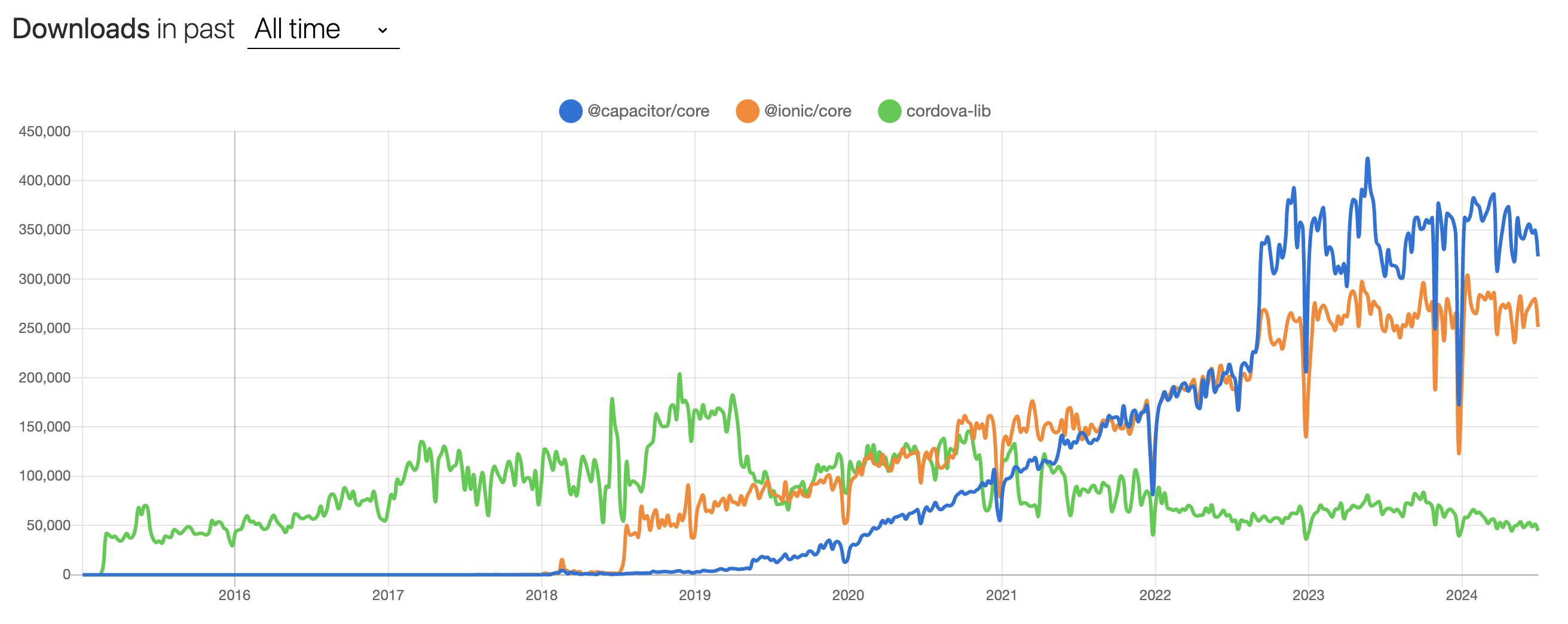
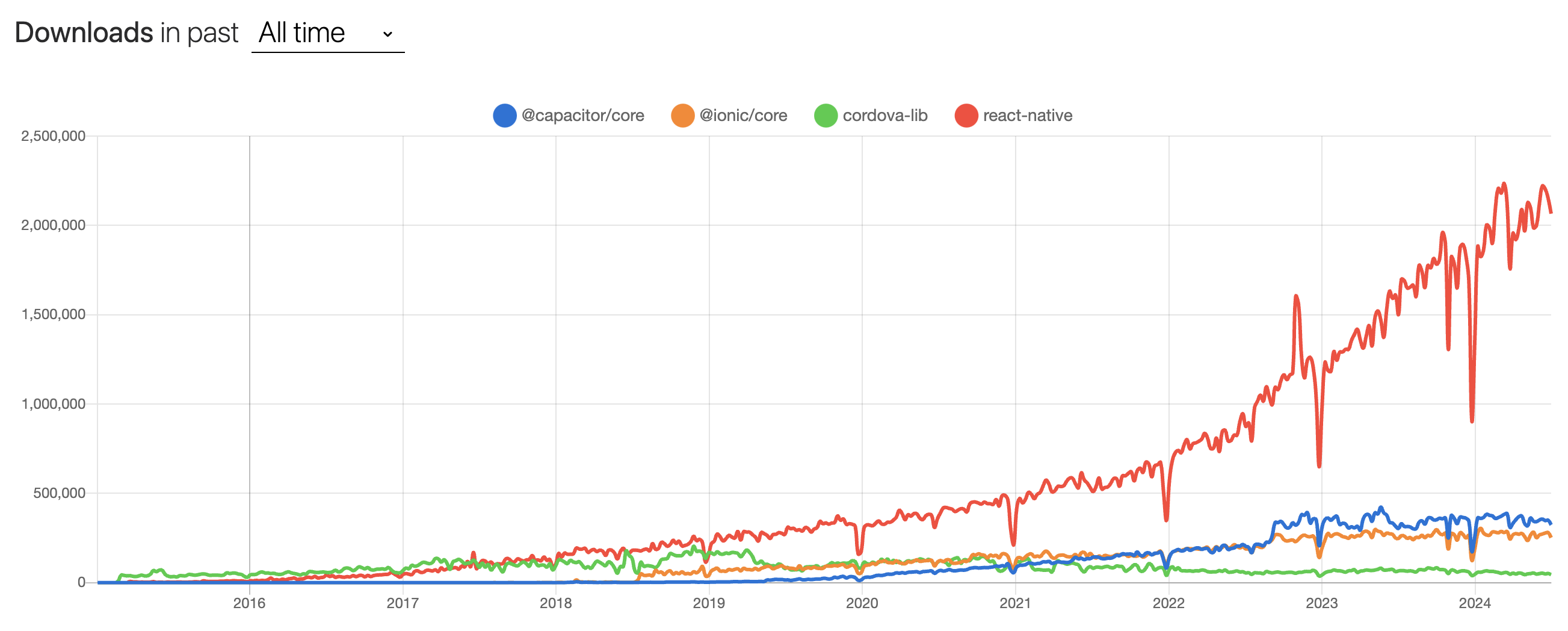
These “build once” technologies gained traction, despite facing various challenges and limitations. The most recent evolution came in 2018 with the release of CapacitorJS, created by the Ionic team. CapacitorJS has been steadily growing in maturity and adoption to date.
This brief history brings us to the current state of WebView technology, where my personal experience with CapacitorJS begins. The following sections will focus on this modern implementation and its implications for mobile development.
Case study of CapacitorJS
My experience with CapacitorJS mirrors the scenario described in the introduction. We were tasked with building both a web application and a native mobile app. The requirements were demanding: the app needed to handle gigabytes of offline data and operate without an internet connection, utilizing native functionalities such as file storage, geolocation, and the device’s camera.
A key factor that facilitated our use of this technology was that our mobile app experience closely mirrored our web application when scaled down responsively.
Capacitor provides an API to identify whether the user is on web or native. This allows developers to build different experiences and handle nuanced edge cases, such as styling for iOS Dynamic Island, appropriately.
if (Capacitor.getPlatform() === ‘web’) {
// do the thing
}
However, adopting Capacitor wasn’t without challenges. One of the biggest hurdles we encountered was that it didn’t “just work” out of the box. We faced significant integration issues, particularly with:
- SSO login flows
- Cookie authentication (We found that Bearer authentication headers are much more reliable on iOS, as the operating system inconsistently deletes local storage)
- Capacitor’s core HTTP library, which has some quirks. For example, it will return a base64 string when a blob or arraybuffer was requested..
These integration pains, especially when first adopting the technology, can be extremely off-putting and frustrating. However, with persistence, we were able to work through these issues. The result was a write-once solution for both web and native mobile apps that met all our product requirements and provided a snappy user experience.
When using Capacitor, you also unlock the ability to use AppFlow, Ionic’s proprietry over-the-air update system, making deploying and rolling back updates to end users a 2 minute breeze. There is a lot to be discussed here, a topic for another post.
While this account may seem to highlight more downsides than advantages, it’s important to note that when this technology works well, it’s nearly invisible. We spent about two weeks addressing these integration challenges, potentially saving months of development time. Moreover, any future features or fixes we implement will be in one place, leading to ongoing efficiency gains over time.
When to choose WebViews?
There is always so much nuance in choosing a tech solution for your problem. WebViews absolutely come with tradeoffs, and you always need to take into account your scenario and how it relates to better decide what will work best for you.
These are some of the reasons to consider a technology like Capacitor:
- A web and native application are needed with a similar user experience
- The teams experience is more bent towards web app development
- The additional time and dedicated resource isn’t worth the potentially marginal or in some cases large gain in performance / native experience of an app built with native technologies
These are some of the reasons to consider not using WebViews
- The product is native mobile first, you either don’t have a web app, or it’s a very small subset, maybe an admin dashboard
- The problem being solved will result in a subpar experience with WebViews, perhaps deep webgl work or similar
- You don’t want to deal with inevitably ongoing teething issues with supporting cross platform (web, iOS and Android)
Ideas on incorporating Capacitor or similar
Modern Web APIs have significantly improved, enabling developers to meet most requirements discussed in the case study without relying on additional frameworks. This is a crucial consideration, as Web APIs typically offer greater reliability and stability compared to niche technologies like Capacitor, which can present adoption challenges as previously discussed.
In my view, the key strengths of Capacitor lie in its ability to abstract the deployment of WebViews to iOS and Android platforms, as well as its integration with deployment tools like AppFlow. However, it’s important to weigh these benefits against the potential drawbacks of adopting a third-party solution.
Given these factors, a recommended strategy would be to prioritize Web APIs over Capacitor plugins where suitable alternatives exist. This approach offers several advantages:
- Reduced coupling with third-party technologies
- Improved long-term maintainability
- Easier migration to alternative solutions if needed
- Better alignment with web standards
Here are some examples of potential Web API alternatives to Capacitor plugins:
| Capacitor Plugin -> | Web API Alternative |
|---|---|
| Camera | MediaDevices.getUserMedia() |
| Geolocation | Geolocation API |
| Storage | Web Storage API (localStorage/sessionStorage) or IndexedDB |
| Filesystem | File System Access API |
By leveraging these Web APIs, developers can create robust, cross-platform applications while minimizing dependence on external frameworks. This strategy allows for greater flexibility and future-proofing of the application architecture.
However, it’s important to note that Capacitor still provides value in scenarios where native functionality is required or when targeting specific mobile platforms. In such cases, a hybrid approach - using Web APIs where possible and Capacitor plugins for platform-specific features - could be an effective solution.
Closing thoughts
When appropriately chosen, Capacitor can be a game changing win for speed to market, ongoing development speed and reduced maintainence overhead. I’ve been pleasently surprised with just how much Capacitor can handle. My initial expectations was that it was going to be a far more inferior experience to a native technology, but that turned out to be not the case, even with the reasonably involved requirements dealt with.
I would always recommend taking an iterative proof-of-concept approach when testing the feasibility of Capacitor or similar for your product, as due to the nature of cross platform nuances, there is every chance you run into an issue that could possibly be deal breaking, or require an alternative solution to achieve what you need, and very important that this is identified early on before being completely committed. Fortunately I have yet to run into any deal breakers like this, and I’ve gone on to implement a second app as well with the same setup.